MarlaX MX102 Flash File Mtk6580 6.0 New Update Firmware
GSM Fazle Rabbi Julay
13, 2019 MARLAX Leave a comment 564 Views
MarlaX MX102 Stock
Firmware ROM (Flash File) download. Which contains MarlaX MX102 Flash File,Flash Tool, USB Driver,
and How To Flash Manual Instructions. This Firmware Will Solve MarlaX MX102 Hang Logo,Dead
Recovery,Monkey Virus and Other Software Issue. Just Download & Enjoy By
Android Flash Firmware
MarlaX MX102 Flash File| Firmware (Stock Rom) | Hang Logo Fix
Firmware Version
MT6580__alps__MX102__MX102__5.1__ALPS.L1.MP6.V2.19_FLYCOM6580.WEG.9.L alt="Marlax mx102 flash file"
MT6580__alps__MX102__MX102__5.1__ALPS.L1.MP6.V2.19_FLYCOM6580.WEG.9.L alt="Marlax mx102 flash file"
MarlaX MX102 Hang On Logo & Dead Recovery
Firmware
Android Version: 6.0 IS Fake Original Version is 5.1
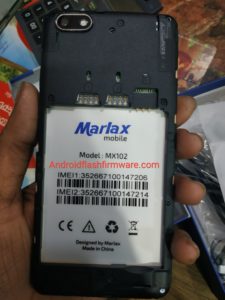
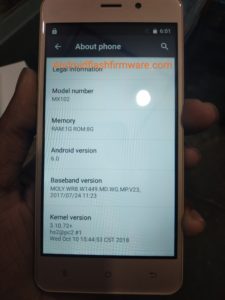

MarlaX MX102 Flash File
MarlaX MX102 Firmware
MarlaX MX102 Stock Rom
MarlaX MX102 Firmware
MarlaX MX102 Stock Rom
MarlaX MX102
Flash File, MarlaX MX102 Firmware Download, MarlaX MX102 Frp Solved, MarlaX
MX102 Dead Recovery Done, MarlaX MX102 Lcd Blank Fix, MarlaX MX102 Hang On Logo
Fix, MarlaX MX102 Hang Logo, MarlaX MX102 Flashing Error Fix, MarlaX MX102
Camera Fix, MarlaX MX102 Monkey Virus Clean 100% Tested.
Firmware Download link
MT6580__alps__MX102__MX102__5.1__ALPS.L1.MP6.V2.19_FLYCOM6580.WEG.9.L

Firmware Not For Free
Any Help
GSM FAZLE RABBI
Call: 01780-524138,01521-388679
Call: 01780-524138,01521-388679
https://frflashpoint.blogspot.com/
Youtube: https://www.youtube.com/channel/UC7FeZFL2ke730yrrB3F5Lcw
Youtube: https://www.youtube.com/channel/UC7FeZFL2ke730yrrB3F5Lcw
MarlaX MX102 Flash File Frp Solved !Death Recovery Done ! Hang Logo
Fix ! Lcd Blank Fix ! Sp Tools Error Fix! Camera Solved! Monkey Virus Clean
Tested 100%!
MarlaX MX102 | LCD Fix | FRP Lock Fix | Dead Recovery Solution
How To Flash MarlaX MX102
Step 1. Download Firmware ROM Included Winrar,Flash Tool,Usb Driver
Step 2. Extract The ROM Or Driver And Tool On Your PC
Step 3. After Extracting You Will See Flash Tool, Driver And Instruction Manual
Step 4. Install the USB Drivers Skip If Drivers Are Already Installed
Step 5. Open The Flash Tool And load Firmware File (Scatter.txt,Pac.Md5,CPB Etc.) From The Flash File Folder
Step 6. Click On Start,Download,Firmware Upgrade,Flash,Write Firmware Button
Step 7. Connect Your Smartphone To The Computer Using By Good USB Cable
Step 8. Green Rink Ok Massage Will Appear Of Successful Flashing Complete And All Done
Step 1. Download Firmware ROM Included Winrar,Flash Tool,Usb Driver
Step 2. Extract The ROM Or Driver And Tool On Your PC
Step 3. After Extracting You Will See Flash Tool, Driver And Instruction Manual
Step 4. Install the USB Drivers Skip If Drivers Are Already Installed
Step 5. Open The Flash Tool And load Firmware File (Scatter.txt,Pac.Md5,CPB Etc.) From The Flash File Folder
Step 6. Click On Start,Download,Firmware Upgrade,Flash,Write Firmware Button
Step 7. Connect Your Smartphone To The Computer Using By Good USB Cable
Step 8. Green Rink Ok Massage Will Appear Of Successful Flashing Complete And All Done
Important Notes :Take
A Backup Of Your ROM Flashing Before As This Help You if Any Wrong Happen After
Flash You Will

No comments:
Post a Comment